
What is the Best CRM and Outlook integration?
Most sales professionals live in their inbox and manage their days through their calendars, and so constantly switching between Outlook and the CRM to log conversations interrupts workflows and creates data gaps when the information isn’t added at all.
While many CRM and Outlook integrations may look good on paper, it’s important to look out for the ones that enable full CRM functionality within the email client, including automatic two-way syncing of contacts and calendar events, as well as emails.
Our solution of choice? SugarAI.
What is SugarAI?
SugarAI is a highly customisable open-source Customer Relationship Management (CRM) software suitable for every business, from SMEs to global corporations.
With a focus on automation and integration, Sugar provides a comprehensive system that optimises lead generation, enhances customer engagement, and drives business growth.
Introducing Sugar Connect
Sugar Connect is Sugar’s email client add-on that lets you work with your Sugar data from within your Outlook account.
The Power of Sugar Connect
Sugar Connect syncs your Outlook emails and calendar into your CRM system, automatically connecting email threads to the correct Contact and Account, so you no longer have to tab back and forth between platforms.
Connect has some truly powerful features that we believe make it the gold standard for CRM and Outlook integrations.
Two-Way Sync
Many Outlook integrations are ‘push only’, meaning they send data to the CRM, but you have no access to CRM data in Outlook. Sugar Connect, however, offers bidirectional synchronisation for all of Sugar’s standard modules, allowing you to view, change, and create records from both Outlook and your CRM.
This includes:
- Accounts
- Contacts
- Leads
- Quotes
- Meetings
- Cases
- And more
This powerful two-way sync means that double data entry is a thing of the past, and you can get on with more important tasks.
Real Time Visibility
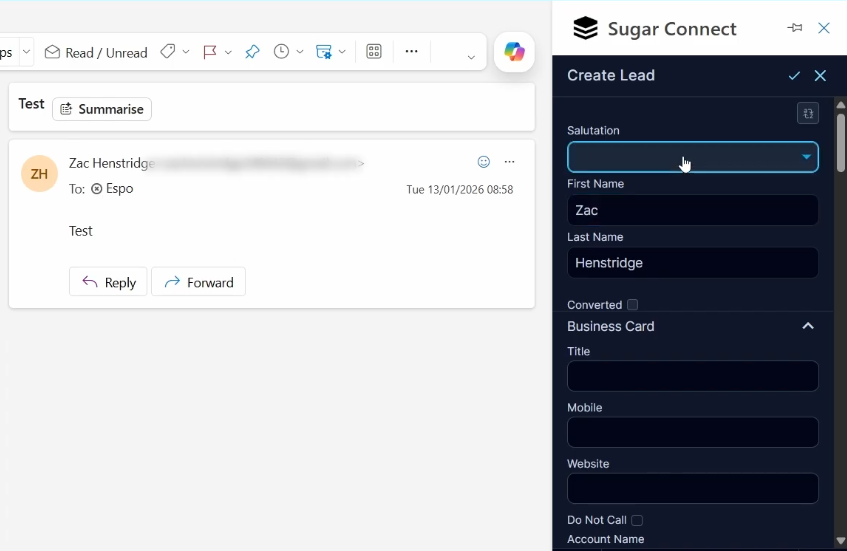
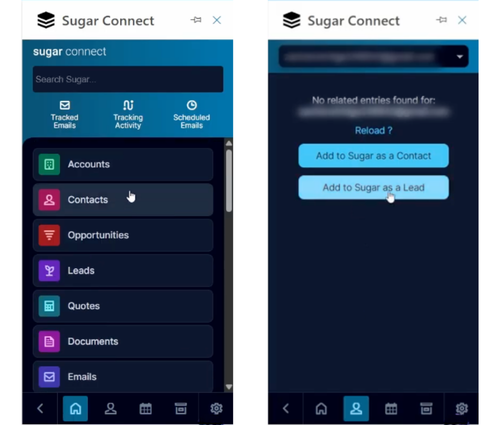
With a powerful integration comes true data visibility. The Sugar Connect sidebar in Outlook automatically pulls up the Contact, Lead, or User record related to the email address you are corresponding with, giving you insights into their previous activity without having to leave your inbox.
You can view their:
- Open opportunities
- Recent support cases
- Full communication history
And if they’re not already in your CRM, the sidebar will prompt you to add them as either a Contact or Lead.
Bringing your Outlook and CRM together ensures that your data is always accurate, insights are always available to you, and your sales team can focus on selling, not clicking.
If you would like to learn more about how to set up and use Sugar Connect, check out this video:



